Macmini8,1
Mac mini (2018)Mac mini2018EFI 64-bitApple T2
Mac mini (2018)
Gigabit Ethernet
Core i3 3.6 GHz, Core i5 3.0 GHz or Core i7 3.2 GHz · Gigabit Ethernet
Untested0/17 tested
Boot0/3 passed
- Stock installer boots via 64-bit EFIUntested
- Internal storage detected and installation completesUntested
- Installed system starts, restarts and shuts down cleanlyUntested
Graphics0/2 passed
- Integrated GPU accelerationUntested
- External display outputUntested 0 of 3 port groupsback-3back-4back-5back-6back-7
Power0/1 passed
- Sleep and wakeUntested
Audio0/3 passed
- Built-in speakersUntested
- Headphone / analog audio outputUntested back-10
- Audio over HDMI / DisplayPortUntested
Networking0/3 passed
- Wi-FiUntested
- BluetoothUntested
- EthernetUntested back-2
Ports0/3 passed
- USB-A portsUntested back-8back-9
- USB-C / Thunderbolt 3 ports (USB data)Untested 0 of 2 port groupsback-3back-4back-5back-6
- Thunderbolt devices (storage, docks, hotplug)Untested 0 of 2 port groupsback-3back-4back-5back-6
- Port methodology
Thermal0/2 passed
- Temperature sensors report under loadUntested
- Fans respond to loadUntested
Hardware Configuration Detailsmacmini8-1-2018-a
- CPU
- Core i3-8100B 3.6 GHz · 4-core; Core i5-8500B 3 GHz · 6-core
BTO: Core i7-8700B 3.2 GHz · 6-core (Coffee Lake) - Memory
- 8 GB DDR4-2666 SO-DIMM · max 64 GB
- Storage
- 128 GB SSD / 256 GB SSD / 512 GB SSD · NVMe · BTO 1 TB SSD, 2 TB SSD
- Graphics
- Intel UHD Graphics 630 · OpenGL ES 3.2
pci:8086:3e9b - Wi-Fi
- Broadcom BCM4364 802.11ac
pci:14e4:4464 - Bluetooth
- Broadcom BCM4364 Bluetooth 5.0 ?
- Audio codec
- Apple T2 audio (via T2 bridge)
pci:106b:1803 - Ethernet
- Broadcom NetXtreme BCM57766 Gigabit Ethernet
pci:14e4:1686 - Storage controller
- Apple ANS2 NVMe controller (T2)
pci:106b:2005 - Thunderbolt controller
- Intel JHL7540 "Titan Ridge" Thunderbolt 3 controller
pci:8086:15eb · pci:8086:15ea · pci:8086:15ec - Apple bridge chip
- Apple T2 bridge and Secure Enclave
pci:106b:1801 · pci:106b:1802 - Ports
- Headphone / line out (analog) · Gigabit Ethernet · HDMI · 4× Thunderbolt 3 (USB-C) · 2× USB 3 (Type-A)
- Port layout
- Download drawing (SVG)
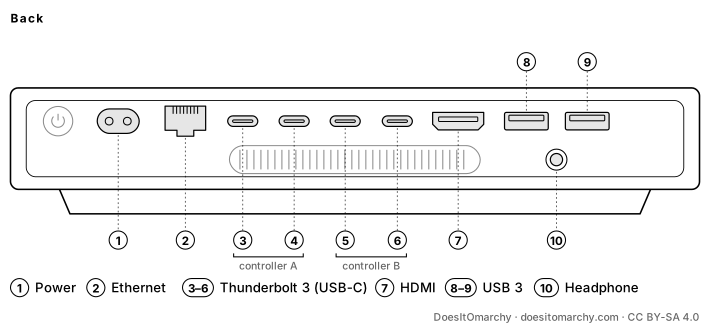
Port methodology - Back:1
back-1Power inlet2back-2Ethernet3back-3Thunderbolt 3 (USB-C)4back-4Thunderbolt 3 (USB-C)5back-5Thunderbolt 3 (USB-C)6back-6Thunderbolt 3 (USB-C)7back-7HDMI8back-8USB 3 (Type-A)9back-9USB 3 (Type-A)10back-10Headphone / line out (analog) (below the USB-A ports)
Numbered left to right as you face each side (top to bottom on a Mac Pro). Source: Apple manual - Back:1
- Features
- Built-in speaker(s) · Cooling fan
- Order no.
- MRTR2LL/A · MRTT2LL/A · MXNF2LL/A · MXNG2LL/A
MXNF2LL/A and MXNG2LL/A are the March 2020 refresh with doubled standard storage; hardware is otherwise identical.
BTO · 10Gb Ethernet
Any CPU · 10Gb Ethernet (build to order)
build to order
Untested0/17 tested
Boot0/3 passed
- Stock installer boots via 64-bit EFIUntested
- Internal storage detected and installation completesUntested
- Installed system starts, restarts and shuts down cleanlyUntested
Graphics0/2 passed
- Integrated GPU accelerationUntested
- External display outputUntested 0 of 3 port groupsback-3back-4back-5back-6back-7
Power0/1 passed
- Sleep and wakeUntested
Audio0/3 passed
- Built-in speakersUntested
- Headphone / analog audio outputUntested back-10
- Audio over HDMI / DisplayPortUntested
Networking0/3 passed
- Wi-FiUntested
- BluetoothUntested
- EthernetUntested back-2
Ports0/3 passed
- USB-A portsUntested back-8back-9
- USB-C / Thunderbolt 3 ports (USB data)Untested 0 of 2 port groupsback-3back-4back-5back-6
- Thunderbolt devices (storage, docks, hotplug)Untested 0 of 2 port groupsback-3back-4back-5back-6
- Port methodology
Thermal0/2 passed
- Temperature sensors report under loadUntested
- Fans respond to loadUntested
Hardware Configuration Detailsmacmini8-1-2018-10gbe
- CPU
- Core i3-8100B 3.6 GHz · 4-core; Core i5-8500B 3 GHz · 6-core; Core i7-8700B 3.2 GHz · 6-core (Coffee Lake)
- Memory
- 8 GB DDR4-2666 SO-DIMM · max 64 GB
- Storage
- 128 GB SSD / 256 GB SSD / 512 GB SSD · NVMe · BTO 1 TB SSD, 2 TB SSD
- Graphics
- Intel UHD Graphics 630 · OpenGL ES 3.2
pci:8086:3e9b - Wi-Fi
- Broadcom BCM4364 802.11ac
pci:14e4:4464 - Bluetooth
- Broadcom BCM4364 Bluetooth 5.0 ?
- Audio codec
- Apple T2 audio (via T2 bridge)
pci:106b:1803 - Ethernet
- Aquantia AQC107 10Gb Ethernet
pci:1d6a:07b1 - Storage controller
- Apple ANS2 NVMe controller (T2)
pci:106b:2005 - Thunderbolt controller
- Intel JHL7540 "Titan Ridge" Thunderbolt 3 controller
pci:8086:15eb · pci:8086:15ea · pci:8086:15ec - Apple bridge chip
- Apple T2 bridge and Secure Enclave
pci:106b:1801 · pci:106b:1802 - Ports
- Headphone / line out (analog) · 10Gb Ethernet · HDMI · 4× Thunderbolt 3 (USB-C) · 2× USB 3 (Type-A)
- Port layout
- Download drawing (SVG)
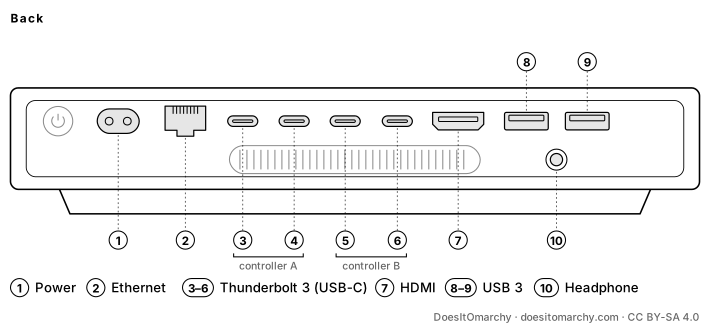
Port methodology - Back:1
back-1Power inlet2back-2Ethernet3back-3Thunderbolt 3 (USB-C)4back-4Thunderbolt 3 (USB-C)5back-5Thunderbolt 3 (USB-C)6back-6Thunderbolt 3 (USB-C)7back-7HDMI8back-8USB 3 (Type-A)9back-9USB 3 (Type-A)10back-10Headphone / line out (analog) (below the USB-A ports)
Numbered left to right as you face each side (top to bottom on a Mac Pro). Source: Apple manual - Back:1
- Features
- Built-in speaker(s) · Cooling fan
Build-to-order 10Gb Ethernet (Aquantia AQC107, atlantic driver) replaces the Broadcom Gigabit controller.
Research notes (unverified)
- Apple T2 chip. The SSD controller, audio and audio are reached through the T2 bridge (apple-bce binds on real Linux machines).
- Booting a non-Apple OS requires Startup Security Utility (in Recovery) set to "No Security" and "Allow booting from external or removable media".
- The Broadcom Wi-Fi/Bluetooth chip needs Apple's firmware files.
- No SD card slot, line-in or IR receiver on this model.
Sources (7) and identifiers
Board IDs: Mac-7BA5B2DFE22DDD8C
- https://support.apple.com/en-us/111912
- https://support.apple.com/en-us/102852
- https://everymac.com/systems/apple/mac_mini/specs/mac-mini-core-i3-3.6-late-2018-specs.html
- https://everymac.com/systems/apple/mac_mini/specs/mac-mini-core-i5-3.0-late-2018-specs.html
- https://everymac.com/systems/apple/mac_mini/specs/mac-mini-core-i7-3.2-late-2018-specs.html
- https://github.com/acidanthera/OpenCorePkg/blob/master/AppleModels/DataBase/Macmini/MM81.yaml
- https://github.com/linuxhw/LsPCI/tree/master/Mini%20Pc/Apple/Macmini8/Macmini8%2C1