iMac18,3
iMac (Retina 5K, 27-inch, 2017)iMac2017EFI 64-bitno security chip
iMac (Retina 5K, 27-inch, 2017)
Blocked by: Display → Internal display at native resolution
Latest diagnostic report 1d2842505e · Omarchy 4.0.6 (stable) · kernel 7.2.8-9-omarchy · tested 2026-10-21 03:57 UTC · @CRH via OmaBoot? Live 1.0.0 33e13bd Live boot with OmaBoot? Thunderbolt 3 USB wake fix
Boot1/3 passed
- Stock installer boots via 64-bit EFISupported
- Internal storage detected and installation completesUntested
- Installed system starts, restarts and shuts down cleanlyUntested
Graphics1/2 passed
- Discrete GPU accelerationSupported
- External display outputUntested back-7back-8
Display1/2 passed
- Internal display at native resolutionPartial
Reported
eDP-1 connected on amdgpu, preferred mode 3840x2160, console at 3840x2160 on amdgpudrmfb, panel 5120x2880 (catalog); the panel scales a 3840x2160 picture up to its 5120x2880 pixels; picture confirmed (two test patterns, both named by the tester: round 1: drew nested boxes, picked it; round 2: drew vertical stripes, picked it) - Display brightness controlSupported
Input1/1 passed
- Ambient light sensorSupported
Power0/1 passed
- Sleep and wakePartial
Reported
slept 18.7 s of a 20s alarm (mode deep), back in 80.3 s; wakeup sources that fired: RTC alarm (PNP0B00:00); ACPI events: GPE 0x07 +1, GPE 0x55 +1; allowed to wake it: PEG0 RP01 ARPT RP02 GIGE RP05 RP17 XHC1; the kernel's steps: sync 0.00 s, freezing tasks 0.05 s; suspend: devices 657 ms, late 3 ms, noirq 77 ms; resume: noirq 77.2 s, early 3 ms, devices 1.1 s; slowest: pcieport 0000:06:02.0 pci_pm_resume_noirq 70.9 s, pcieport 0000:05:00.0 pci_pm_resume_noirq 5.1 s, thunderbolt 0000:07:00.0 pci_pm_resume_noirq 3.5 s; not back after 30 s: USB usb3, USB usb4; after waking, backlight: acpi_video0 bl_power 0 (on), brightness 79 of 79; the tester typed the code shown after waking (691)
Audio0/4 passed
- Built-in speakersFailed
Why it failed
played through hw:0,0 (CS8409 Analog, Cirrus Logic CS8409); only "Headphone Phantom Jack" (always reads plugged in: the codec can't sense the jack); opened as 2 ch S16_LE 48000 Hz, channel map FL,FR,UNKNOWN,UNKNOWN; stereo WAV, left beeps on channel 1, right on 2; left channel: 5 beeps, answered nothing heard; right channel: 2 beeps, answered nothing heard - Built-in microphoneFailed
Why it failed
recorded hw:0,0 (CS8409 Analog, Cirrus Logic CS8409) at 16 kHz mono; room -90 dBFS (median of 30 windows of 50 ms); note D5 587 Hz (1.5 s) through hw:0,0 (CS8409 Analog, Cirrus Logic CS8409): not found (0 of 53 windows heard it, 8 needed; best window +0 dB over the frequencies around it); claps because note D5 not found; claps (10 ms peaks over -55 dBFS, 120 ms apart at least): asked for 3 claps, counted 0; asked for 2 claps, counted 0; loudest window since -90 dBFS (+0 dB); the tester clapped and said the level bar stayed put - Headphone / analog audio outputFailed
back-1
Why it failed
played through hw:0,0 (CS8409 Analog, Cirrus Logic CS8409); only "Headphone Phantom Jack" (always reads plugged in: the codec can't sense the jack); while the headphones played: speaker pin 0x24 pin-ctls 0x40: OUT (output on); speaker pin 0x25 pin-ctls 0x40: OUT (output on); no speaker switch or auto-mute control; opened as 2 ch S16_LE 48000 Hz, channel map FL,FR,UNKNOWN,UNKNOWN; stereo WAV, left beeps on channel 1, right on 2; left channel: 2 beeps, answered nothing heard; right channel: 4 beeps, answered nothing heard - Audio over HDMI / DisplayPortUntested
Camera1/1 passed
- Built-in webcamSupported
Networking3/3 passed
- Wi-FiSupported
- BluetoothSupported
- EthernetSupported back-9
Ports3/4 passed
- USB-A portsSupported back-3back-4back-5back-6
- USB-C / Thunderbolt 3 ports (USB data)Partial
back-7back-8
Reported
ports seen: 2; 1-13: Keychron Keychron Q5 Max (3434:0850) at 12 Mb/s (USB 1.1): 2 input events from it (a move or a key) (on the Mac's main USB controller, not the Thunderbolt 3 chip's); 4-2: USB Disk 20 (346d:5678) at 5000 Mb/s (USB 3): OmaBoot?'s test file OMABOOT-TEST.BIN (FAT32, MBR partition 1) on sdb read: 32 MiB, every byte its pattern, 66.3 MB/s (seen once the Thunderbolt 3 USB controller was kept awake); not counted: 2-4, a USB-A port; the Thunderbolt 3 chip's USB controller (0000:08:00.0 (8086:15d4)) was asleep (runtime-suspended) with nothing seen for 15 s: Linux doesn't take the PCIe wake signal (PME) on a Mac, so a plug-in can't wake it; kept awake from 27 s into the test (power/control on, OmaBoot?'s Thunderbolt 3 USB wake fix), put back after; the tester tried every port; port map, in the order asked: back-8 Thunderbolt 3 (USB-C) = 1-13, firmware says panel=unknown, vertical=upper, horizontal=left; back-7 Thunderbolt 3 (USB-C) = 4-2, firmware says panel=unknown, vertical=upper, horizontal=left - Thunderbolt devices (storage, docks, hotplug)Supported back-7back-8
- SD card readerSupported back-2
- Port methodology
Thermal2/2 passed
- Temperature sensors report under loadSupported
- Fans respond to loadSupported
Diagnostic reports1
- 1d2842505e tested 2026-10-21 03:57 UTC Omarchy 4.0.6 (stable) · kernel 7.2.8-9-omarchy @CRH via OmaBoot? Live 1.0.0 33e13bd Live boot with OmaBoot? Thunderbolt 3 USB wake fix 13 3 3
Hardware Configuration Detailsimac18-3-5k-2017-a
- CPU
- Core i5-7500 3.4 GHz · 4-core; Core i5-7600 3.5 GHz · 4-core; Core i5-7600K 3.8 GHz · 4-core
BTO: Core i7-7700K 4.2 GHz · 4-core (Kaby Lake) - Memory
- 8 GB DDR4-2400 SO-DIMM · max 64 GB
- Storage
- 1 TB Fusion Drive / 2 TB Fusion Drive · SATA · BTO 3 TB Fusion Drive, 256 GB SSD, 512 GB SSD, 1 TB SSD, 2 TB SSD
- Display
- 27" 5120×2880 · Retina 5K LED IPS
- Graphics
- AMD Radeon Pro 570 / 575 / 580 / 570X / 575X / 580X (Polaris 10/20) · OpenGL ES 3.2
pci:1002:67df - Wi-Fi
- Broadcom BCM43602 802.11ac
pci:14e4:43ba - Bluetooth
- Apple Bluetooth 4.2 (USB 05ac:8296)
usb:05ac:8296 - Audio codec
- Cirrus Logic CS8409 (with CS42L42)
- Camera
- Apple FaceTime HD camera (USB 05ac:8511)
usb:05ac:8511 - Ethernet
- Broadcom NetXtreme BCM57766 Gigabit Ethernet
pci:14e4:1686 - Storage controller
- Intel 100 Series SATA controller
pci:8086:a102 - Storage controller
- Apple SSD (Samsung NVMe) BTO
pci:144d:a804 · pci:144d:a806 - Thunderbolt controller
- Intel JHL6540 "Alpine Ridge" Thunderbolt 3 controller
pci:8086:15d3 · pci:8086:15d2 · pci:8086:15d4 · pci:8086:1578 - SD card reader
- Broadcom BCM57765 SDXC card reader
pci:14e4:16bc - Ports
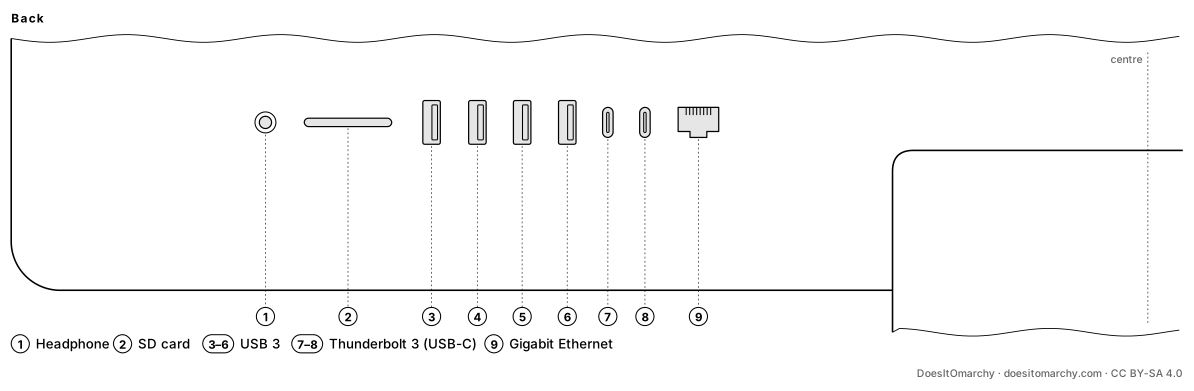
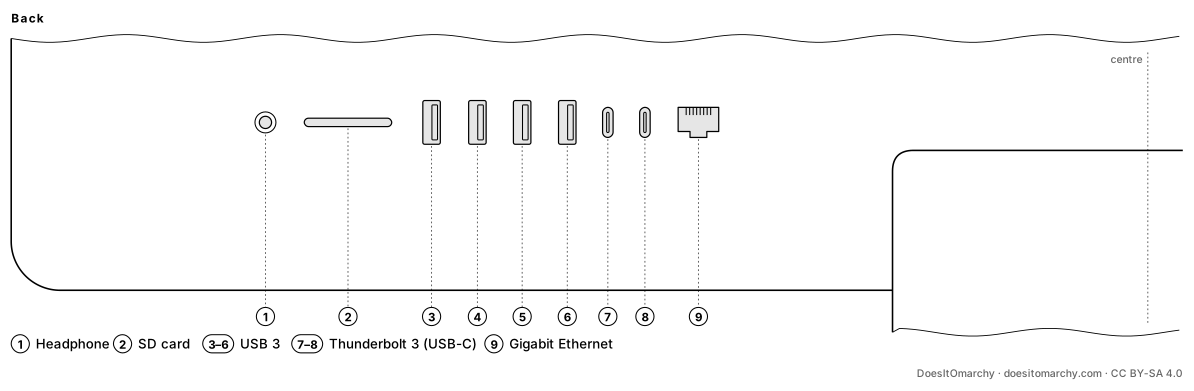
- Headphone / line out (analog) · Gigabit Ethernet · SD card slot · 2× Thunderbolt 3 (USB-C) · 4× USB 3 (Type-A)
- Port layout
Port methodology - Back:1
back-1Headphone / line out (analog)2back-2SD card slot (passed, or covered by a port in the same port group: SD card reader covered by the whole criterion)3back-3USB 3 (Type-A) (passed, or covered by a port in the same port group: USB-A ports covered by the whole criterion)4back-4USB 3 (Type-A) (passed, or covered by a port in the same port group: USB-A ports covered by the whole criterion)5back-5USB 3 (Type-A) (passed, or covered by a port in the same port group: USB-A ports covered by the whole criterion)6back-6USB 3 (Type-A) (passed, or covered by a port in the same port group: USB-A ports covered by the whole criterion)7back-7Thunderbolt 3 (USB-C) (partly tested, nothing failed: External display output untested; USB-C / Thunderbolt 3 ports (USB data) untested; Thunderbolt devices (storage, docks, hotplug) covered by the whole criterion)8back-8Thunderbolt 3 (USB-C) (partly tested, nothing failed: External display output untested; USB-C / Thunderbolt 3 ports (USB data) untested; Thunderbolt devices (storage, docks, hotplug) covered by the whole criterion)9back-9Gigabit Ethernet (passed, or covered by a port in the same port group: Ethernet covered by the whole criterion)
- Back:1
- Features
- Built-in display · Built-in speaker(s) · Built-in microphone · Cooling fan · Ambient light sensor · Audio over Mini DisplayPort / Thunderbolt
- Order no.
- MNE92LL/A · MNEA2LL/A · MNED2LL/A
Research notes (unverified)
- Audio is a Cirrus Logic CS8409 codec; on many observed machines Linux fell back to the generic HDA parser, so audio needs attention in testing.
- Radeon Pro 570, 575 and 580 are the same Polaris chip.
Sources (8) and identifiers
Board IDs: Mac-BE088AF8C5EB4FA2
- https://support.apple.com/en-us/111969
- https://support.apple.com/en-us/108054
- https://everymac.com/systems/apple/imac/specs/imac-core-i5-3.4-27-inch-aluminum-retina-5k-mid-2017-specs.html
- https://everymac.com/systems/apple/imac/specs/imac-core-i5-3.5-27-inch-aluminum-retina-5k-mid-2017-specs.html
- https://everymac.com/systems/apple/imac/specs/imac-core-i5-3.8-27-inch-aluminum-retina-5k-mid-2017-specs.html
- https://everymac.com/systems/apple/imac/specs/imac-core-i7-4.2-27-inch-aluminum-retina-5k-mid-2017-specs.html
- https://github.com/acidanthera/OpenCorePkg/blob/master/AppleModels/DataBase/iMac/IM183.yaml
- https://github.com/linuxhw/LsPCI/tree/master/All%20In%20One/Apple/iMac18/iMac18%2C3