iMac4,1
iMac (20-inch, Early 2006)iMac2006EFI 32-bitno security chip
Not compatible: 32-bit-only CPU (Intel Core Duo "Yonah"). Omarchy and Arch Linux support x86_64 only.
iMac (17-inch, Early 2006)
17-inch
Core Duo 1.83 GHz · Radeon X1600
Not compatible0/24 tested
Known limitation: The ATI Radeon X1600 reaches OpenGL ES 2.0 only. Hyprland 0.50 and later needs 3.0, so stock Omarchy's desktop won't start. Software rendering or a GLES 2.0 fork of Hyprland may work; results will tell.
Boot0/3 passed
- Installer boots via 32-bit EFI workaroundNot compatible
- Internal storage detected and installation completesNot compatible
- Installed system starts, restarts and shuts down cleanlyNot compatible
Graphics0/2 passed
- Discrete GPU accelerationNot compatible
- External display outputNot compatible back-9
Display0/2 passed
- Internal display at native resolutionNot compatible
- Display brightness controlNot compatible
Input0/1 passed
- IR receiver (Apple Remote)Not compatible
Power0/1 passed
- Sleep and wakeNot compatible
Audio0/6 passed
- Built-in speakersNot compatible
- Built-in microphoneNot compatible
- Headphone / analog audio outputNot compatible back-1
- Line-in / analog audio inputNot compatible back-2
- Optical digital audio outputNot compatible back-1
- Optical digital audio inputNot compatible back-2
Camera0/1 passed
- Built-in webcamNot compatible
Networking0/3 passed
- Wi-FiNot compatible
- BluetoothNot compatible
- EthernetNot compatible back-8
Ports0/2 passed
- USB-A portsNot compatible back-3back-4back-5
- FireWireNot compatible back-6back-7
- Port methodology
Storage0/1 passed
- Internal optical drive reads discsNot compatible
Thermal0/2 passed
- Temperature sensors report under loadNot compatible
- Fans respond to loadNot compatible
Hardware Configuration Detailsimac4-1-17-early-2006-a
- CPU
- Core Duo T2400 1.83 GHz (Yonah)
- Memory
- 0.5 GB DDR2-667 SO-DIMM · max 2 GB
- Storage
- 160 GB HDD · SATA
- Display
- 17" 1440×900 · LCD
- Graphics
- ATI Radeon X1600 · OpenGL ES 2.0
pci:1002:71c5 - Wi-Fi
- Broadcom BCM4311 802.11a/b/g
pci:14e4:4312 - Bluetooth
- Apple Bluetooth 2.0+EDR (USB 05ac:8206)
usb:05ac:8206 - Audio codec
- SigmaTel/IDT STAC9221
- Camera
- Apple iSight (USB 05ac:8300)
usb:05ac:8300 - Ethernet
- Marvell Yukon 88E8053 Gigabit Ethernet
pci:11ab:4362 - Storage controller
- Intel ICH7-M SATA controller
pci:8086:27c4 · pci:8086:27c5 - FireWire controller
- LSI FW322/323 FireWire 400 controller
pci:11c1:5811 - IR receiver
- Apple IR receiver (USB 05ac:8240)
usb:05ac:8240 - Ports
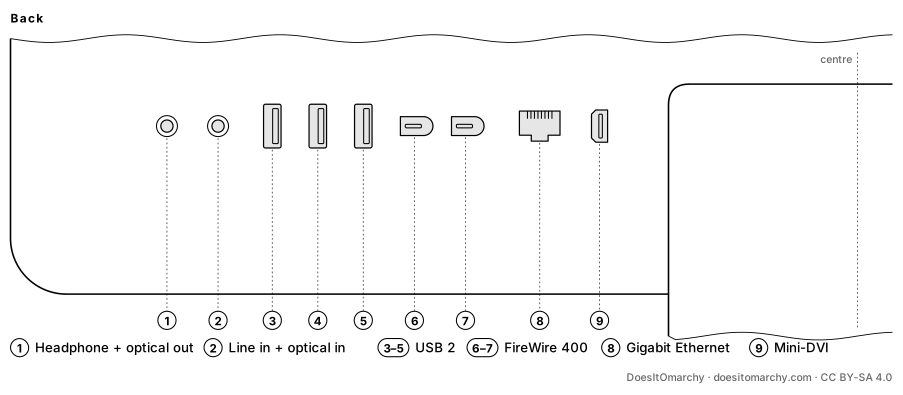
- Line in (analog) · Optical digital audio in · Headphone / line out (analog) · Optical digital audio out · Gigabit Ethernet · 2× FireWire 400 · Mini-DVI · 3× USB 2.0 (Type-A)
- Port layout
- Download drawing (SVG)
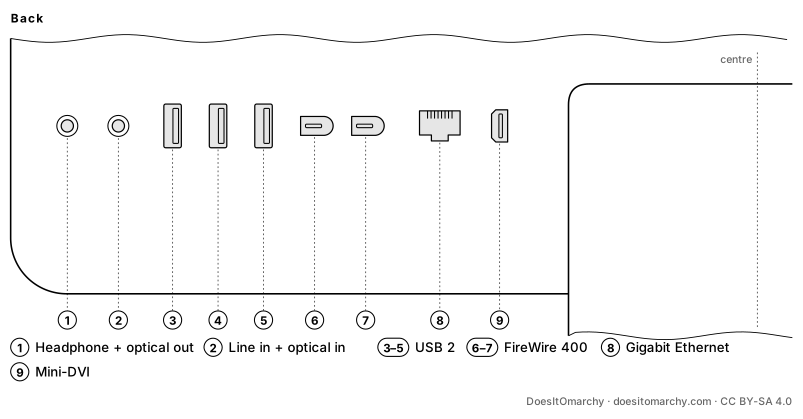
Port methodology - Back:1
back-1Headphone / line out (analog) + Optical digital audio out2back-2Line in (analog) + Optical digital audio in3back-3USB 2.0 (Type-A)4back-4USB 2.0 (Type-A)5back-5USB 2.0 (Type-A)6back-6FireWire 4007back-7FireWire 4008back-8Gigabit Ethernet9back-9Mini-DVI
- Back:1
- Features
- Built-in display · Built-in speaker(s) · Built-in microphone · Cooling fan · IR receiver (Apple Remote) · Internal optical drive
- Order no.
- MA199LL/A
iMac (20-inch, Early 2006)
20-inch
Core Duo 2.0 GHz · Radeon X1600
Not compatible0/24 tested
Known limitation: The ATI Radeon X1600 reaches OpenGL ES 2.0 only. Hyprland 0.50 and later needs 3.0, so stock Omarchy's desktop won't start. Software rendering or a GLES 2.0 fork of Hyprland may work; results will tell.
Boot0/3 passed
- Installer boots via 32-bit EFI workaroundNot compatible
- Internal storage detected and installation completesNot compatible
- Installed system starts, restarts and shuts down cleanlyNot compatible
Graphics0/2 passed
- Discrete GPU accelerationNot compatible
- External display outputNot compatible back-9
Display0/2 passed
- Internal display at native resolutionNot compatible
- Display brightness controlNot compatible
Input0/1 passed
- IR receiver (Apple Remote)Not compatible
Power0/1 passed
- Sleep and wakeNot compatible
Audio0/6 passed
- Built-in speakersNot compatible
- Built-in microphoneNot compatible
- Headphone / analog audio outputNot compatible back-1
- Line-in / analog audio inputNot compatible back-2
- Optical digital audio outputNot compatible back-1
- Optical digital audio inputNot compatible back-2
Camera0/1 passed
- Built-in webcamNot compatible
Networking0/3 passed
- Wi-FiNot compatible
- BluetoothNot compatible
- EthernetNot compatible back-8
Ports0/2 passed
- USB-A portsNot compatible back-3back-4back-5
- FireWireNot compatible back-6back-7
- Port methodology
Storage0/1 passed
- Internal optical drive reads discsNot compatible
Thermal0/2 passed
- Temperature sensors report under loadNot compatible
- Fans respond to loadNot compatible
Hardware Configuration Detailsimac4-1-20-early-2006-a
- CPU
- Core Duo T2500 2 GHz (Yonah)
- Memory
- 0.5 GB DDR2-667 SO-DIMM · max 2 GB
- Storage
- 250 GB HDD · SATA
- Display
- 20" 1680×1050 · LCD
- Graphics
- ATI Radeon X1600 · OpenGL ES 2.0
pci:1002:71c5 - Wi-Fi
- Broadcom BCM4311 802.11a/b/g
pci:14e4:4312 - Bluetooth
- Apple Bluetooth 2.0+EDR (USB 05ac:8206)
usb:05ac:8206 - Audio codec
- SigmaTel/IDT STAC9221
- Camera
- Apple iSight (USB 05ac:8300)
usb:05ac:8300 - Ethernet
- Marvell Yukon 88E8053 Gigabit Ethernet
pci:11ab:4362 - Storage controller
- Intel ICH7-M SATA controller
pci:8086:27c4 · pci:8086:27c5 - FireWire controller
- LSI FW322/323 FireWire 400 controller
pci:11c1:5811 - IR receiver
- Apple IR receiver (USB 05ac:8240)
usb:05ac:8240 - Ports
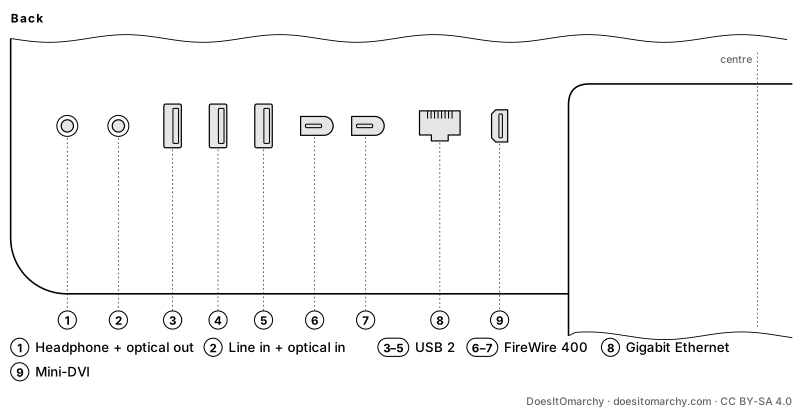
- Line in (analog) · Optical digital audio in · Headphone / line out (analog) · Optical digital audio out · Gigabit Ethernet · 2× FireWire 400 · Mini-DVI · 3× USB 2.0 (Type-A)
- Port layout
- Download drawing (SVG)
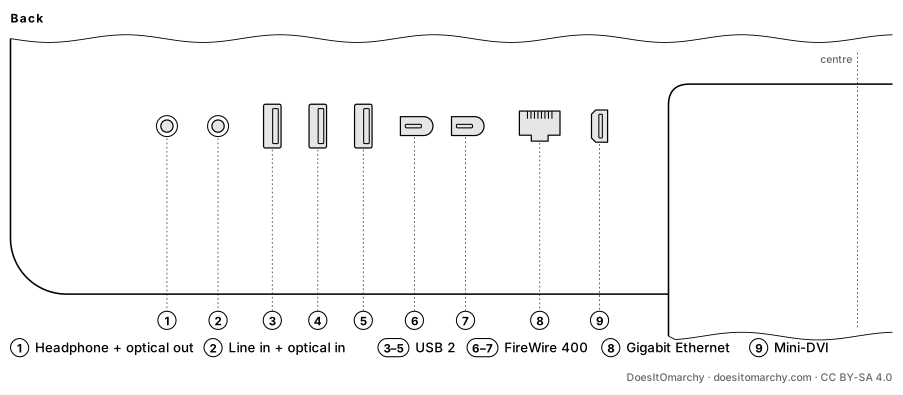
Port methodology - Back:1
back-1Headphone / line out (analog) + Optical digital audio out2back-2Line in (analog) + Optical digital audio in3back-3USB 2.0 (Type-A)4back-4USB 2.0 (Type-A)5back-5USB 2.0 (Type-A)6back-6FireWire 4007back-7FireWire 4008back-8Gigabit Ethernet9back-9Mini-DVI
- Back:1
- Features
- Built-in display · Built-in speaker(s) · Built-in microphone · Cooling fan · IR receiver (Apple Remote) · Internal optical drive
- Order no.
- MA200LL/A
Research notes (unverified)
- First Intel iMac. Every configuration has a 32-bit Yonah CPU, so none can run Omarchy.
Sources (4) and identifiers
Board IDs: Mac-F42786C8, Mac-F42787C8
- https://everymac.com/systems/apple/imac/specs/imac_cd_1.83_17.html
- https://everymac.com/systems/apple/imac/specs/imac_cd_2.0_20.html
- https://github.com/acidanthera/OpenCorePkg/blob/master/AppleModels/DataBase/iMac/IM41.yaml
- https://github.com/linuxhw/LsPCI/tree/master/All%20In%20One/Apple/iMac4/iMac4%2C1